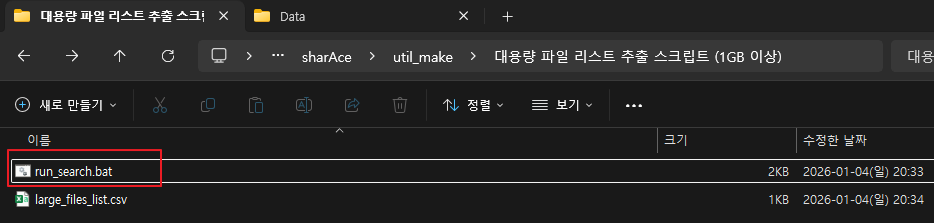
더블클릭 실행 :
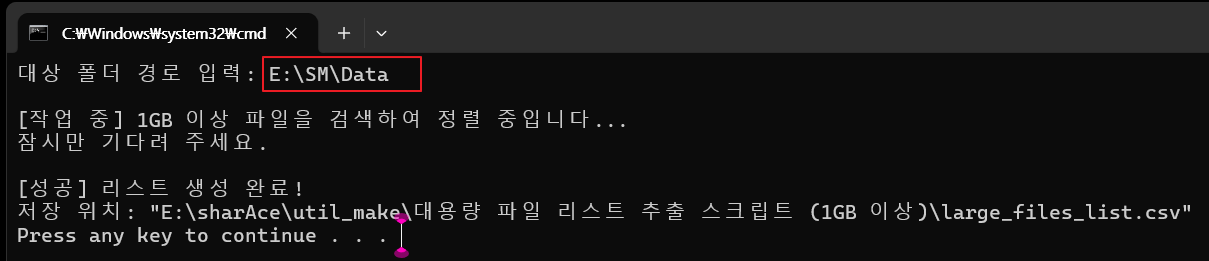
CMD 창에서 원하는 경로를 넣어준다. (bat 폴더의 위치는 아무곳이나 상관없다)
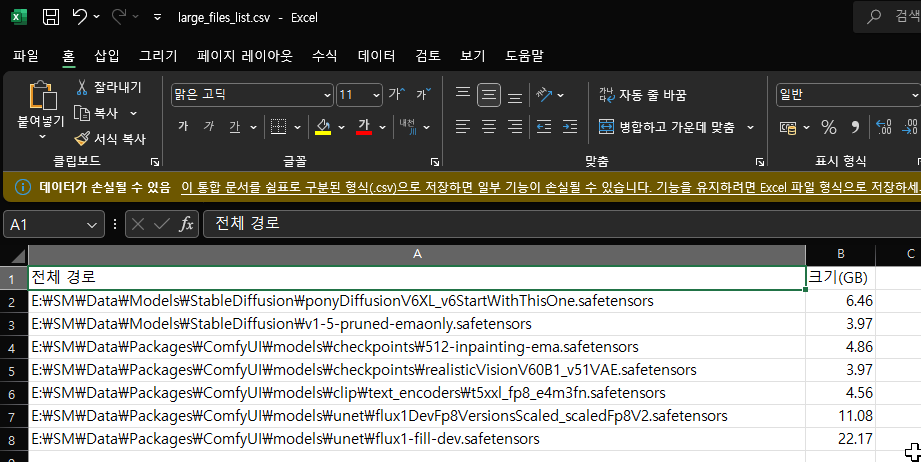
run_search.bat
@echo off
chcp 65001 >nul
set /p target="대상 폴더 경로 입력: "
:: 경로에서 따옴표 제거
set "target=%target:"=%"
set "output=%~dp0large_files_list.csv"
echo.
echo [작업 중] 1GB 이상 파일을 검색하여 정렬 중입니다...
echo 잠시만 기다려 주세요.
:: 파워쉘 명령 하나로 헤더 생성, 검색, 정렬, 저장을 한 번에 처리
powershell -NoProfile -ExecutionPolicy Bypass -Command ^
"$results = Get-ChildItem -Path '%target%' -Recurse -File -ErrorAction SilentlyContinue | " ^
"Where-Object { $_.Length -ge 1GB } | " ^
"Sort-Object FullName | " ^
"Select-Object @{Name='전체 경로';Expression={$_.FullName}}, @{Name='크기(GB)';Expression={[Math]::Round($_.Length / 1GB, 2)}}; " ^
"$results | Export-Csv -Path '%output%' -NoTypeInformation -Encoding UTF8"
echo.
if exist "%output%" (
echo [성공] 리스트 생성 완료!
echo 저장 위치: "%output%"
start "" "%output%"
) else (
echo [실패] 1GB 이상 파일이 없거나 경로가 잘못되었습니다.
)
pause
'OS > Windows' 카테고리의 다른 글
| 윈도우11 BAT 파일이 시작메뉴에 고정이 안될때 (0) | 2026.01.06 |
|---|