브라우저에서 이 주소 열기: https://github.com/IAHispano/Applio-RVC-Fork
페이지가 열리면 오른쪽 위에 초록색 Code 버튼 클릭 → Download ZIP 선택해서 ZIP 파일 다운로드 해주세요.
첫 단계 E:\portable\TTS_VC 폴더 안에 들어가서
다운로드 받은것을 압출을 풀면
E:\portable\TTS_VC\Applio-main 이 됩니다.
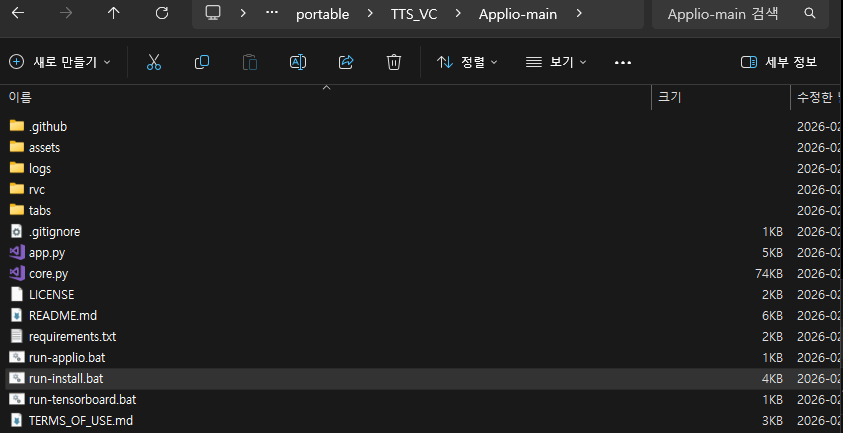
그안에
Applio-main 폴더 안에 run-install.bat 파일이 있는 걸 확인
이 파일을 더블클릭해서 실행해주세요.
- 창이 뜨면서 자동으로 Miniconda 다운로드 → 설치 → 환경 생성 → 패키지 설치가 진행됩니다.
- 인터넷 연결이 필요해요 (Miniconda 다운로드 때문에).
- 설치 중에 에러 없이 끝나면 "Applio has been installed successfully!" 메시지와 함께 "To start Applio, please run 'run-applio.bat'." 라고 나와요.
- 끝나면 pause 때문에 창이 멈춰 있을 거예요. 아무 키나 눌러서 닫으세요.
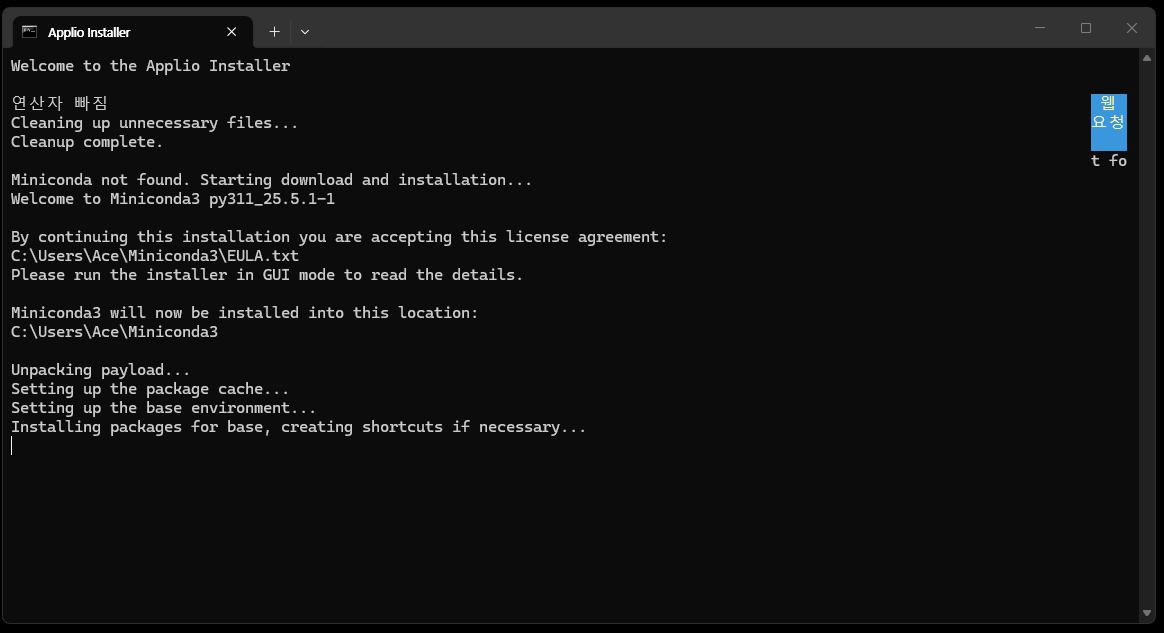
설치 진행중.....................
Welcome to the Applio Installer
연산자 빠짐 웹
Cleaning up unnecessary files... 요청
Cleanup complete.
t fo
Miniconda not found. Starting download and installation...
Welcome to Miniconda3 py311_25.5.1-1
By continuing this installation you are accepting this license agreement:
C:\Users\Ace\Miniconda3\EULA.txt
Please run the installer in GUI mode to read the details.
Miniconda3 will now be installed into this location:
C:\Users\Ace\Miniconda3
Unpacking payload...
Setting up the package cache...
Setting up the base environment...
Installing packages for base, creating shortcuts if necessary...
Initializing conda directories...
Done!
Miniconda installation complete.
Creating Conda environment...
Channels:
- defaults
Platform: win-64
Collecting package metadata (repodata.json): done
Solving environment: done
## Package Plan ##
environment location: E:\portable\TTS_VC\Applio-main\env
added / updated specs:
- python=3.11
The following packages will be downloaded:
package | build
---------------------------|-----------------
bzip2-1.0.8 | h2bbff1b_6 90 KB
ca-certificates-2025.12.2 | haa95532_0 125 KB
expat-2.7.4 | hd7fb8db_0 32 KB
libexpat-2.7.4 | hd7fb8db_0 121 KB
libffi-3.4.4 | hd77b12b_1 122 KB
libzlib-1.3.1 | h02ab6af_0 64 KB
openssl-3.0.19 | hbb43b14_0 6.9 MB
packaging-25.0 | py311haa95532_1 190 KB
pip-25.3 | pyhc872135_0 1.1 MB
python-3.11.14 | h981015d_0 17.7 MB
setuptools-80.10.2 | py311haa95532_0 1.7 MB
sqlite-3.51.1 | hda9a48d_0 917 KB
tk-8.6.15 | hf199647_0 3.5 MB
tzdata-2025c | he532380_0 118 KB
ucrt-10.0.22621.0 | haa95532_0 620 KB
vc-14.3 | h2df5915_10 19 KB
vc14_runtime-14.44.35208 | h4927774_10 825 KB
vs2015_runtime-14.44.35208 | ha6b5a95_10 19 KB
wheel-0.46.3 | py311haa95532_0 95 KB
xz-5.6.4 | h4754444_1 280 KB
zlib-1.3.1 | h02ab6af_0 113 KB
------------------------------------------------------------
Total: 34.6 MB
The following NEW packages will be INSTALLED:
bzip2 pkgs/main/win-64::bzip2-1.0.8-h2bbff1b_6
ca-certificates pkgs/main/win-64::ca-certificates-2025.12.2-haa95532_0
expat pkgs/main/win-64::expat-2.7.4-hd7fb8db_0
libexpat pkgs/main/win-64::libexpat-2.7.4-hd7fb8db_0
libffi pkgs/main/win-64::libffi-3.4.4-hd77b12b_1
libzlib pkgs/main/win-64::libzlib-1.3.1-h02ab6af_0
openssl pkgs/main/win-64::openssl-3.0.19-hbb43b14_0
packaging pkgs/main/win-64::packaging-25.0-py311haa95532_1
pip pkgs/main/noarch::pip-25.3-pyhc872135_0
python pkgs/main/win-64::python-3.11.14-h981015d_0
setuptools pkgs/main/win-64::setuptools-80.10.2-py311haa95532_0
sqlite pkgs/main/win-64::sqlite-3.51.1-hda9a48d_0
tk pkgs/main/win-64::tk-8.6.15-hf199647_0
tzdata pkgs/main/noarch::tzdata-2025c-he532380_0
ucrt pkgs/main/win-64::ucrt-10.0.22621.0-haa95532_0
vc pkgs/main/win-64::vc-14.3-h2df5915_10
vc14_runtime pkgs/main/win-64::vc14_runtime-14.44.35208-h4927774_10
done
#
# To activate this environment, use
#
# $ conda activate E:\portable\TTS_VC\Applio-main\env
#
# To deactivate an active environment, use
#
# $ conda deactivate
Conda environment created successfully.
Installing uv package installer...
Collecting uv
Downloading uv-0.10.0-py3-none-win_amd64.whl.metadata (12 kB)
Downloading uv-0.10.0-py3-none-win_amd64.whl (23.4 MB)
━━━━━━━━━━━━━━━━━━━━━━━━━━━━━━━━━━━━━━━━ 23.4/23.4 MB 17.4 MB/s 0:00:01
Installing collected packages: uv
Successfully installed uv-0.10.0
uv installation complete.
Installing dependencies...
Using Python 3.11.14 environment at: env
Resolved 1 package in 142ms
Prepared 1 package in 347ms
Uninstalled 1 package in 361ms
░░░░░░░░░░░░░░░░░░░░ [0/1] Installing wheels... warning: Failed to hardlink files; falling back to full copy. This may lead to degraded performance.
If the cache and target directories are on different filesystems, hardlinking may not be supported.
If this is intentional, set `export UV_LINK_MODE=copy` or use `--link-mode=copy` to suppress this warning.
Installed 1 package in 717ms
- setuptools==80.10.2
+ setuptools==82.0.0
Using Python 3.11.14 environment at: env
Resolved 124 packages in 5.47s
Built wget==3.2
Prepared 122 packages in 2m 22s
░░░░░░░░░░░░░░░░░░░░ [0/122] Installing wheels... warning: Failed to hardlink files; falling back to full copy. This may lead to degraded performance.
If the cache and target directories are on different filesystems, hardlinking may not be supported.
If this is intentional, set `export UV_LINK_MODE=copy` or use `--link-mode=copy` to suppress this warning.
Installed 122 packages in 3m 04s
+ absl-py==2.4.0
+ aiofiles==24.1.0
+ aiohappyeyeballs==2.6.1
+ aiohttp==3.13.3
+ aiosignal==1.4.0
+ annotated-doc==0.0.4
+ annotated-types==0.7.0
+ anyio==4.12.1
+ attrs==25.4.0
+ audioread==3.1.0
+ beautifulsoup4==4.14.3
+ brotli==1.2.0
+ certifi==2026.1.4
+ cffi==2.0.0
+ charset-normalizer==3.4.4
+ click==8.3.1
+ colorama==0.4.6
+ contourpy==1.3.3
+ cycler==0.12.1
+ decorator==5.2.1
+ edge-tts==7.2.7
+ einops==0.8.2
+ faiss-cpu==1.7.3
+ fastapi==0.128.5
+ ffmpeg-python==0.2.0
+ ffmpy==1.0.0
+ filelock==3.20.3
+ fonttools==4.61.1
+ frozenlist==1.8.0
+ fsspec==2026.2.0
+ future==1.0.0
+ gradio==6.4.0
+ gradio-client==2.0.3
+ groovy==0.1.2
+ grpcio==1.78.0
+ h11==0.16.0
+ httpcore==1.0.9
+ httpx==0.28.1
+ huggingface-hub==0.36.2
+ hyper-connections==0.4.9
+ idna==3.11
+ jinja2==3.1.6
+ joblib==1.5.3
+ kiwisolver==1.4.9
+ lazy-loader==0.4
+ librosa==0.11.0
+ llvmlite==0.44.0
+ local-attention==1.11.2
+ markdown==3.10.1
+ markdown-it-py==4.0.0
+ markupsafe==3.0.3
+ matplotlib==3.7.2
+ mdurl==0.1.2
+ mpmath==1.3.0
+ msgpack==1.1.2
+ multidict==6.7.1
+ networkx==3.6.1
+ noisereduce==3.0.3
+ numba==0.61.0
+ numpy==1.26.4
+ orjson==3.11.7
+ pandas==2.3.3
+ pedalboard==0.9.22
+ pillow==12.1.0
+ platformdirs==4.5.1
+ pooch==1.9.0
+ propcache==0.4.1
+ protobuf==6.33.5
+ pycparser==3.0
+ pydantic==2.12.5
+ pydantic-core==2.41.5
+ pydub==0.25.1
+ pygments==2.19.2
+ pyparsing==3.0.9
+ pypresence==4.6.1
+ python-dateutil==2.9.0.post0
+ python-multipart==0.0.22
+ pytz==2025.2
+ pyyaml==6.0.3
+ regex==2026.1.15
+ requests==2.31.0
+ resampy==0.4.3
+ rich==14.3.2
+ safehttpx==0.1.7
+ safetensors==0.7.0
+ scikit-learn==1.8.0
+ scipy==1.11.1
+ semantic-version==2.10.0
+ shellingham==1.5.4
+ six==1.17.0
+ sounddevice==0.5.5
+ soundfile==0.12.1
+ soupsieve==2.8.3
+ soxr==1.0.0
+ starlette==0.52.1
+ stftpitchshift==2.0
+ sympy==1.14.0
+ tabulate==0.9.0
+ tensorboard==2.20.0
+ tensorboard-data-server==0.7.2
+ tensorboardx==2.6.4
+ threadpoolctl==3.6.0
+ tokenizers==0.19.1
+ tomlkit==0.13.3
+ torch==2.7.1+cu128
+ torch-einops-utils==0.0.28
+ torchaudio==2.7.1+cu128
+ torchcrepe==0.0.23
+ torchfcpe==0.0.4
+ torchvision==0.22.1+cu128
+ tqdm==4.67.3
+ transformers==4.44.2
+ typer==0.21.1
+ typing-extensions==4.15.0
+ typing-inspection==0.4.2
+ tzdata==2025.3
+ urllib3==2.6.3
+ uvicorn==0.40.0
+ webrtcvad-wheels==2.0.14
+ werkzeug==3.1.5
+ wget==3.2
+ yarl==1.22.0
Dependencies installation complete.
연산자 빠짐
Installation time: 23 hours, 8 minutes, 15 seconds.
Applio has been installed successfully
To start Applio, please run 'run-applio.bat'.
계속하려면 아무 키나 누르십시오 . . .
run-install.bat 실행이 끝났나요? (창에 "Applio has been installed successfully!" 메시지 나오고, "run 'run-applio.bat'" 언급됐으면 성공)
이제 Applio-main 폴더 안에 run-applio.bat 파일이 생겼을 거예요. 그 파일을 더블클릭해서 실행해주세요.
- 창이 뜨면서 Applio 웹UI가 자동으로 로딩됩니다.
- 처음이면 추가 패키지 다운로드나 모델 체크가 있을 수 있어요 (몇 분 걸림).
- 끝나면 콘솔에 "Running on local URL: http://127.0.0.1:7860" 이런 주소가 나와요.
브라우저(크롬 등)에서 그 주소 열어보세요. Applio 웹UI가 뜨면 성공입니다.
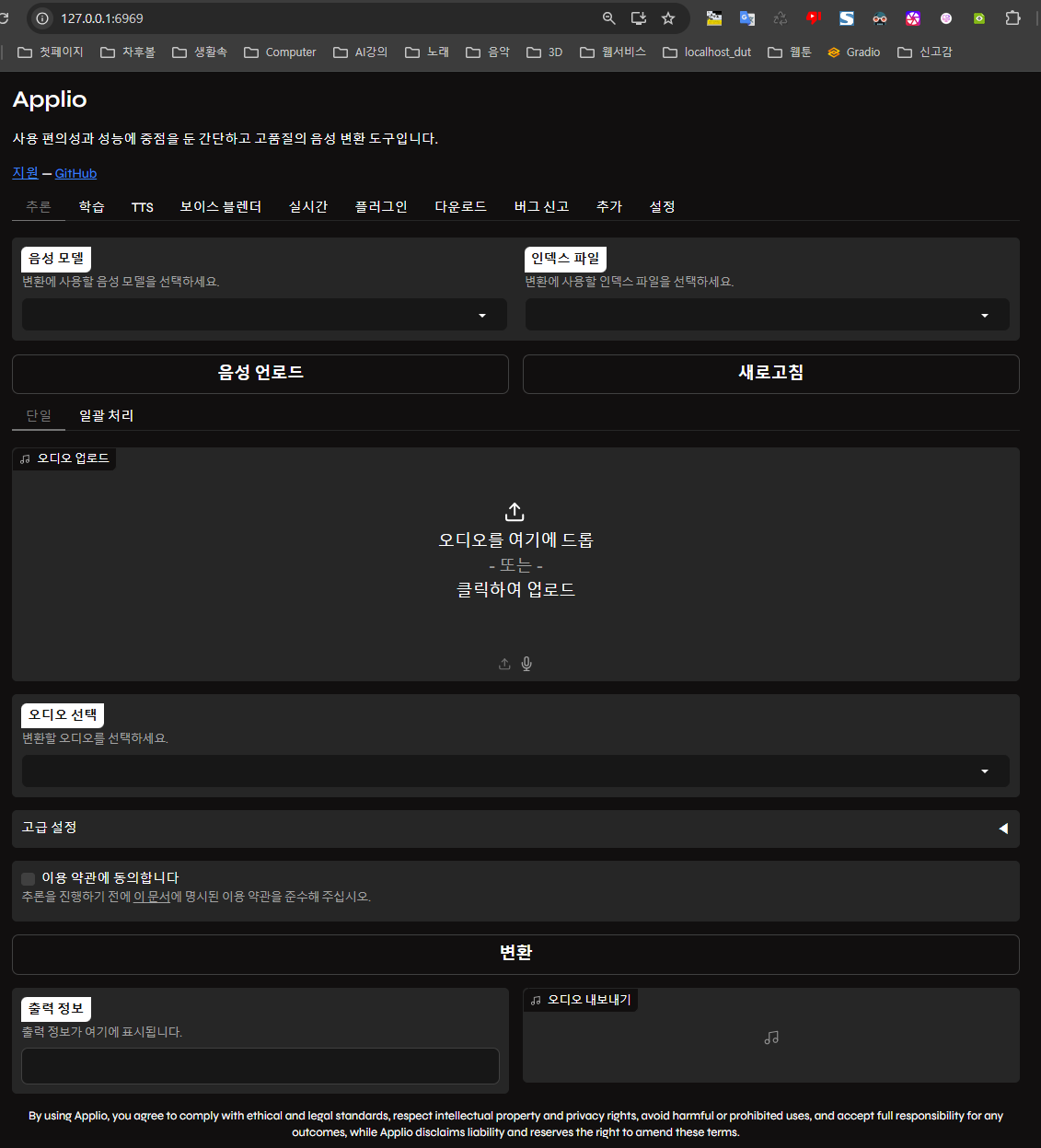
여기서 부터~~~~ 학습을 위한 pth 이다 하지말자. 무시해라@@@@@ 단지 다운로드 받는 법과, 다운로드 받은 파일이 어느 폴더에 위치하는지 만 확인하면 됨.
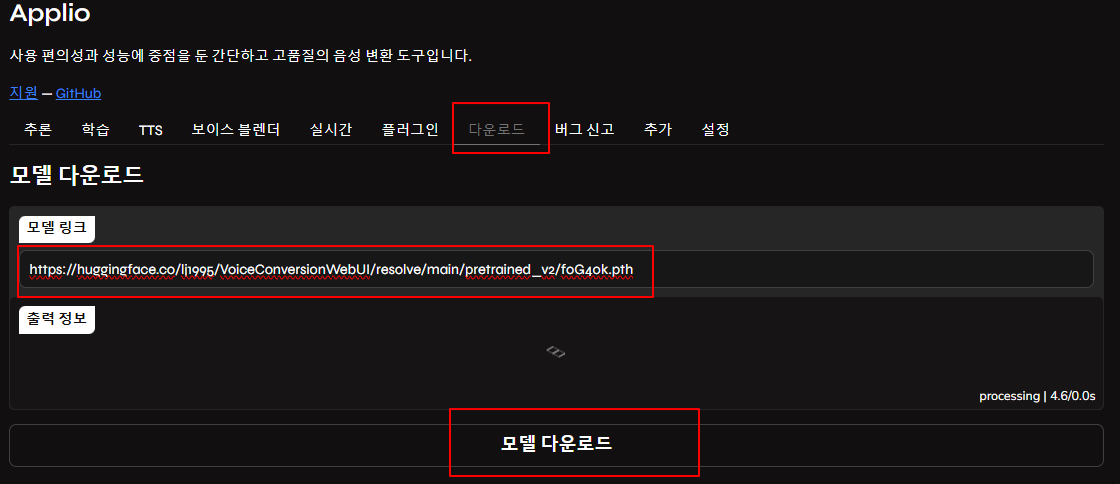
지금 할 일
- Applio 웹UI 다운로드 탭으로 다시 가세요.
- 모델 링크 입력란을 비우세요.
- 아래 실제 URL 하나를 복사해서 붙여넣기 해주세요 (이건 실제 한국어 남성 모델 예시예요):
https://huggingface.co/lj1995/VoiceConversionWebUI/resolve/main/pretrained_v2/f0G40k.pth(이건 RVC 기본 pretrained 모델 중 하나로, 한국어에도 잘 맞아요. 나중에 더 좋은 모델로 바꿀 수 있어요)
- 모델 다운로드 버튼 누르세요.
다운로드가 시작되면 "Downloading all files..." 이런 메시지 나오고 끝나면 "Model downloaded successfully." 나와요.
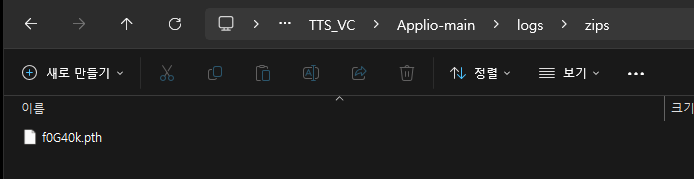
f0G40k.pth 파일이 Applio-main/logs/zips 폴더 안에 있는 건 정상이에요.
왜 logs/zips에 들어갔나?
Applio 설치 스크립트 (run-install.bat)에서
- 다운로드된 파일들을 임시로 logs/zips 폴더에 저장한 다음
- 필요한 곳 (weights 또는 pretrained_v2)으로 이동시키는 과정이 있어요. 하지만 일부 pretrained 모델 (f0G40k.pth 같은 기본 모델)은 로그 폴더에 그대로 남아 있거나, 수동으로 옮겨야 하는 경우가 종종 발생해요. (버그나 설치 순서 문제로)
여기까지~~~~ 학습을 위한 pth 이다 하지말자. 무시해라@@@@@ 단지 다운로드 받는 법과, 다운로드 받은 파일이 어느 폴더에 위치하는지 만 확인하면 됨.
추천 사이트 목록 (미리듣기 + 다운로드 가능)
- AI Hub (한국어 중심, 가장 추천)
- https://aihub.or.kr/aihubdata/data/list.do (검색: RVC 또는 voice conversion)
- 또는 직접 RVC 모델 공유: https://aihub.or.kr/community (포럼 검색 "RVC 모델" 또는 "pth") → 한국어 목소리 많고, 샘플 오디오 미리듣기 가능
- Weights.gg (RVC 모델 전문 갤러리, 최고)
- https://weights.gg/ → 검색창에 "Korean" 또는 "남성" "여성" "애니" 등 입력 → 각 모델 페이지에 샘플 오디오 재생 버튼 있음 (들어보고 다운로드) → .pth + .index 파일 직접 다운로드 가능
- Hugging Face - RVC Models
- https://huggingface.co/models?sort=trending&search=rvc → "rvc" 또는 "voice conversion" 검색 → 한국어 모델: "korean rvc" 또는 "f0D40k" "f0G40k" 같은 키워드 → 모델 페이지 들어가면 Files and versions 탭 → .pth 파일 클릭 → 다운로드 → 일부 모델에 샘플 오디오 첨부됨
- Voice Models Discord 서버 (실시간 공유 + 미리듣기 최고)
- https://discord.gg/voice-models (또는 "RVC Voice Models" 검색해서 들어가기) → #model-sharing 채널 들어가면 사람들이 .pth 공유하고, 샘플 음성 미리듣기 링크 올림 → 한국어 모델도 꽤 많아요
- RVC 한국 커뮤니티 (네이버 카페 등)
- 네이버 카페 "RVC 한국" 또는 "AI 보이스 모델 공유" 검색 → 카페 들어가서 "모델 공유" 게시판 보면 .pth + 샘플 음원 링크 많음
빠른 시작 추천 (지금 당장 해볼 만한)
- Weights.gg 들어가서 "Korean" 검색 → 맨 위 모델 하나 클릭 → 샘플 재생 들어보기 → 맘에 들면 .pth 다운로드
- 다운로드한 .pth 파일을 E:\portable\TTS_VC\Applio-main\weights 폴더에 넣기
- Applio 웹UI 새로고침(F5) → 음성 모델 드롭다운에 뜸
하나 다운로드해서 weights 폴더에 넣고, 웹UI에서 목록에 떴는지 확인
https://www.weights.com/models?search=korean+male

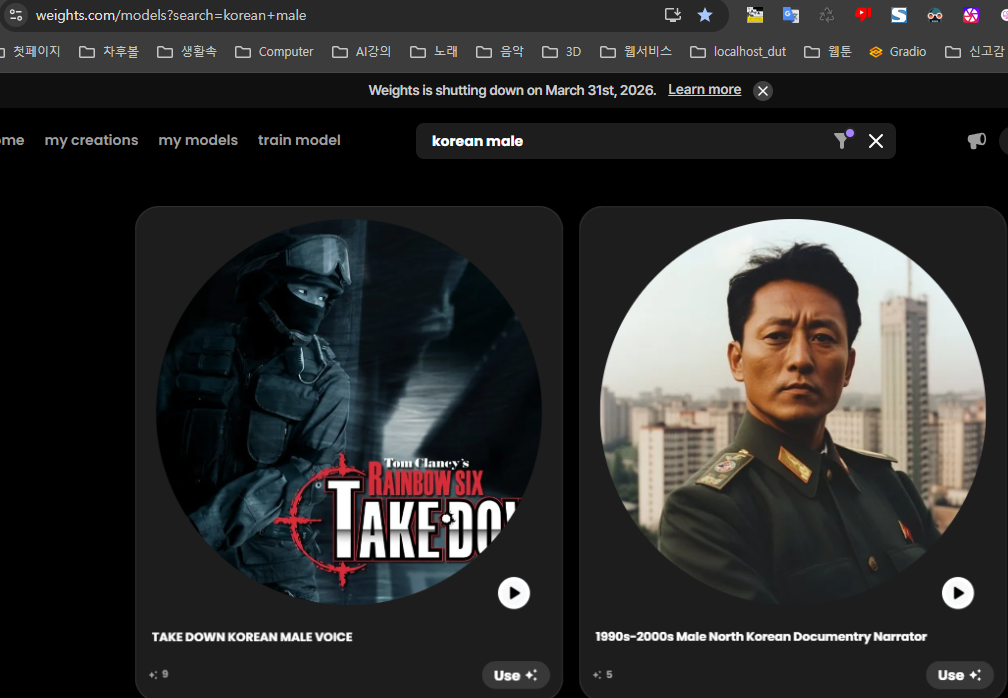
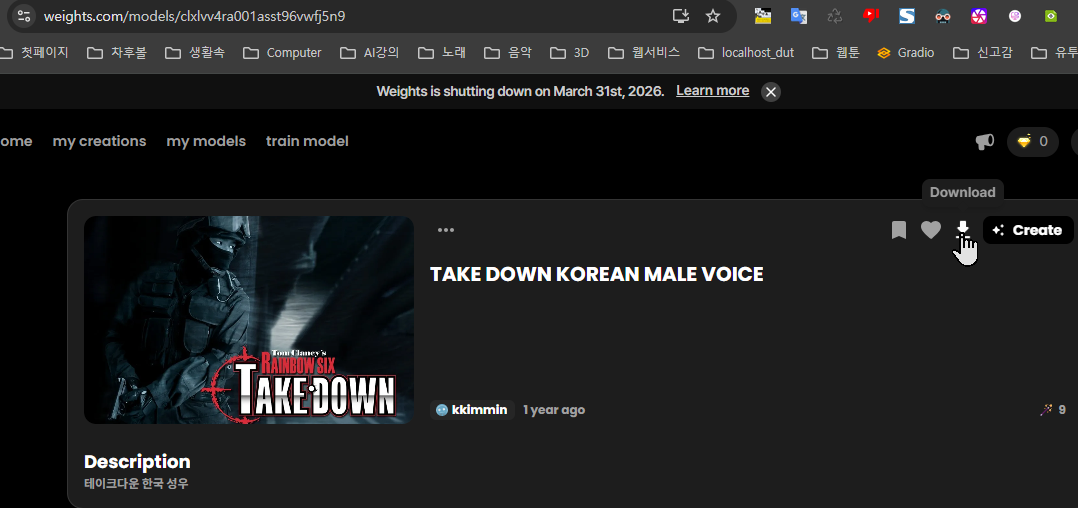
다운로드 받으면 받은 파일은 zip 파일로 해제하여 아래 위치에 두면 된다.
E:\portable\TTS_VC\Applio-main\logs\zips
이 폴더 아래에 다운로드 받는 모든 모델들을 넣어주면 된다. 즉 어떤 남자의 여자이 어린이의 목소리 모델(한가지 음성만 가진) 을 넣으면 된다.
pth 와 index 파일을 가진다. json 도 있고.
지금 목표: 남자 목소리 → 여자 목소리 (또는 허스키한 남자) 변환
당신이 붙여준 고급 설정 캡처를 다시 봤어요.
현재 보이는 주요 파라미터들:
- 피치 (Pitch): 0 (중간)
- 특징 검사 비율 (Feature Search Ratio / Index Ratio): 0.75 (높음)
- 볼륨 밸런스로스 (Volume Balance / RMS Mix): 1.0 (원본 볼륨 그대로)
- 무성 자음 보호 (Protect Voice): 0.6
- 피치 추출 알고리즘: rmvpe (현재 선택됨)
- 임베딩 모델: korean-hubert-base (한국어에 최적) ----> 아니야!! contentvec 로 해야함!!
이 설정을 기반으로 남→여 변환을 가장 잘 하려면 아래처럼 조정하는 게 제일 효과적이에요.
추천 1: 남자 → 여자 목소리 변환 (가장 자연스럽게)
고급 설정 드롭다운 열고 아래처럼 바꿔보세요:
- 피치 (Pitch): +6 ~ +9 (여자 목소리는 원래보다 6~9 반음 높아야 자연스러움. +7부터 시작 추천) ----> 아니야 아무리 피치 높혀도 남자 목소리를 여자 목소리가 되지않아.
- 특징 검사 비율 (Index Ratio): 0.65 ~ 0.75 (0.7 정도가 보통 좋음. 너무 높이면 원본 감정 깨짐)
- 볼륨 밸런스로스 (RMS Mix): 0.9 ~ 1.0 (여자 목소리는 살짝 작게 들릴 수 있어서 0.95 추천)
- 무성 자음 보호 (Protect Voice): 0.4 ~ 0.5 (0.45 정도. 낮추면 여자 특유의 숨소리·부드러움 살아남)
- 피치 추출 알고리즘: rmvpe 그대로 유지 (한국어에 가장 잘 맞음)
추천 시작 값 세트 (이걸 먼저 테스트):
- Pitch: +7
- Index Ratio: 0.7
- RMS Mix: 0.95
- Protect Voice: 0.45
Fish Speech MP3 업로드 → 변환 → 들어보고 피치가 너무 높으면 +6으로, 낮으면 +8로 조정하세요.
추천 2: 남자 → 허스키한(거칠고 낮은) 남자 목소리 변환
허스키한 느낌을 더 강하게 하려면:
- 피치 (Pitch): -3 ~ -6 (낮은 톤으로 거칠게)
- Index Ratio: 0.75 ~ 0.85 (목소리 특징 강하게 적용)
- Protect Voice: 0.3 ~ 0.4 (낮은 톤에서 숨소리·거칠음 살아나게)
- RMS Mix: 1.0 ~ 1.1 (볼륨 세게 해서 더 강렬하게)
추천 시작 값 세트:
- Pitch: -4
- Index Ratio: 0.8
- Protect Voice: 0.35
- RMS Mix: 1.0
다음으로 해볼 것
- 위 추천 1 (남→여) 세트로 먼저 변환 한번 해보세요.
- 결과 음성 들어보고 “여자 느낌 나나요?” / “피치 너무 높아” / “허스키하게 바꿔볼까” 이런 식으로 알려주시면 그때부터 미세조정 들어갈게요.
TTS 탭도 잇으나, 한글은 전혀 읽을줄 모르고 에러가 난다. 영문자로 하면 한국어 말도 하지만 부자연스럽다.
'AI' 카테고리의 다른 글
| TTS 설치하기 (Fish Speech) - 로컬 무료 (0) | 2026.02.08 |
|---|---|
| ComfyUI - TTS 추천 및 4070랩탑 처리 관련 (0) | 2026.01.20 |
| Image to 3D AI 평가 (1) | 2026.01.15 |
| 합성 - 이미지 유로 사이트 정리 (0) | 2026.01.04 |
| 합성 - 동영상 유료 서비스들 정리 (0) | 2026.01.02 |